
Google Index / URL Inspection Demo Tool
This tool lets you test a URL inspection call. If your backend isn’t running, it will show a clear message instead of failing.
What Is Google’s “Index Website” Tool — and How It Helps You Get Pages into Google Search
Byline: Staff Reporter — October 18, 2025
Lead: Google provides several tools that site owners use to check whether pages are in Google’s index and to request recrawling or re-indexing. The most commonly used is the URL Inspection feature inside Google Search Console; developers can also use APIs to automate checks and requests. (Google Help)
Body:
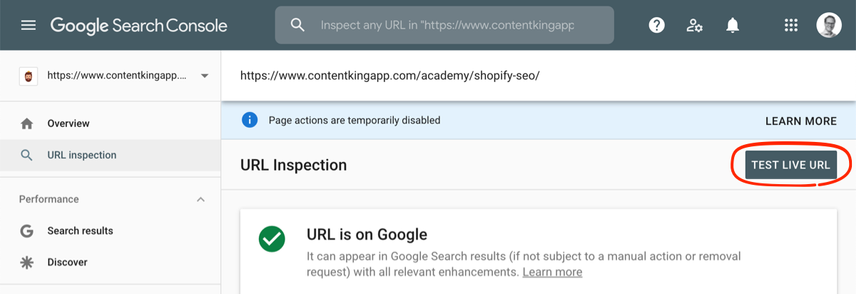
Website owners and SEO teams frequently ask: “How do I make sure Google knows about my new page?” The short answer: use Google Search Console’s URL Inspection tool to view the index status of a URL and — if needed — request indexing. The URL Inspection tool shows crawl, render and indexing information directly from Google’s index and can be used to request (re)indexing of pages you manage. (Google Help)
For developers and larger publishers, Google exposes programmatic options too. The URL Inspection API and related developer tools allow automated retrieval of the same index data shown in Search Console, and in supported workflows you can request indexing programmatically. These APIs are useful for monitoring large sites and building custom dashboards. (Google for Developers)
How long does indexing take? There’s no guaranteed time: manual requests via the URL Inspection tool often complete quickly, but indexing can still take days or longer depending on factors such as crawl budget, site health, and the page’s perceived uniqueness and quality. Google’s guidance on asking Google to recrawl emphasizes that you can’t request indexing for URLs you don’t control, and that indexing is not instantaneous. (Google for Developers)
In 2025 Google made changes that tightened index quality controls. Many site owners noted a spike in pages being removed or ignored by Google’s index in mid-2025, prompting renewed focus on site quality, structured data, and technical crawlability to avoid de-indexing. That broader context means requests for indexing may be scrutinized more closely and sites should prioritize clean, authoritative content and good technical SEO. (Indexing Insight)
Practical steps for site owners:
- Verify your site in Google Search Console.
- Use the URL Inspection tool to fetch a URL’s index status and any errors. If the page is not indexed, click Request indexing after fixing problems. (Google Help)
- Submit XML sitemaps and keep them up to date — sitemaps help Google discover new content. (Google)
- For high-volume operations, integrate with the URL Inspection API to automate checks and flag pages that need attention. (Google for Developers)
Bottom line: Google’s index tools let you check what Google knows about your pages and ask for recrawling, but good indexing outcomes still rely on sound content and technical foundations. Use the URL Inspection tool for ad-hoc checks and the APIs for scale — and treat any indexing request as the final step after fixing crawlability, structured data, and content-quality issues. (Google Help)
Technology / SEO
What Is Google’s “Index Website” Tool — and How It Helps You Get Pages into Google Search
Google provides several tools that site owners use to check whether pages are in Google’s index and to request recrawling or re-indexing. The most commonly used is the URL Inspection feature inside Google Search Console; developers can also use APIs to automate checks and requests.
What the tool does
The URL Inspection tool in Google Search Console shows crawl, render, and indexing status for a specific URL — straight from Google’s index. If a page isn’t indexed, the tool lists issues and offers a Request indexing action after you fix problems.
Options for developers and large sites
For automated workflows, Google provides APIs (including the URL Inspection API) that return the same indexing information you see in Search Console. These APIs let publishers monitor large numbers of URLs and build custom dashboards or alerting systems.
How long does indexing take?
There’s no guaranteed time. Manual requests often complete quickly, but indexing depends on crawl budget, site health, and content quality. Treat a “Request indexing” action as a nudge — not an instant guarantee.
Recent context (2024–2025)
Google’s indexing rules and quality systems evolved in 2025, with many site owners reporting stricter index controls and a higher bar for content quality. That context makes technical SEO and content quality more important than ever when requesting indexing.
Practical steps
- Verify your site in Google Search Console.
- Use the URL Inspection tool to check a URL’s index status and fix any errors before requesting indexing.
- Submit and maintain an accurate XML sitemap to help discovery.
- Consider the URL Inspection API for automated monitoring at scale.
More resources
- Google Search Console — URL Inspection (official Help & docs).
- Google Developers — URL Inspection API (for automation).
- Google documentation on asking Google to re-crawl URLs and sitemaps.